Stop Wasting Hours on Google Ads Monitoring

Get Your Weekly Ads Monitor 🏎️💨

Transform messy Google Ads data into 💎 clear weekly insights with automated comparisons and smart filters   

Stop Wasting Hours on Google Ads Monitoring

Get Your Weekly Ads Monitor 🏎️💨

Transform messy Google Ads data into 💎 clear weekly insights with automated comparisons and smart filters   

You're lost in Google Ads data 😤

☹️
Time Wasted
Hours spent clicking through endless Google Ads tabs every Monday morning.
😓
Scattered Data
Manual copying and calculating while opportunities slip by.
🤬
Missing Trends
Can't quickly spot which campaigns are trending up or down.

Now 🥳 Meet Your New Monday Morning Game-Changer

The Weekly Google Ads Monitor is a free, automated dashboard 🤯 that turns your messy Google Ads data into clean, actionable weekly insights.

1️⃣ ✅ Automated Weekly Snapshots – Every key metric tracked week by week.

2️⃣ ✅ Smart Year-Over-Year Comparisons – Instantly spot trends and seasonal patterns.

3️⃣ ✅ Dynamic Filtering – View all campaigns, exclude brand campaigns, or filter by campaign type.

4️⃣ ✅ Color-Coded Performance – Green for wins, red for concerns, at a glance.

5️⃣ ✅ Set-and-Forget Setup – One 10-minute installation, lifetime of insights.

See It in Action:

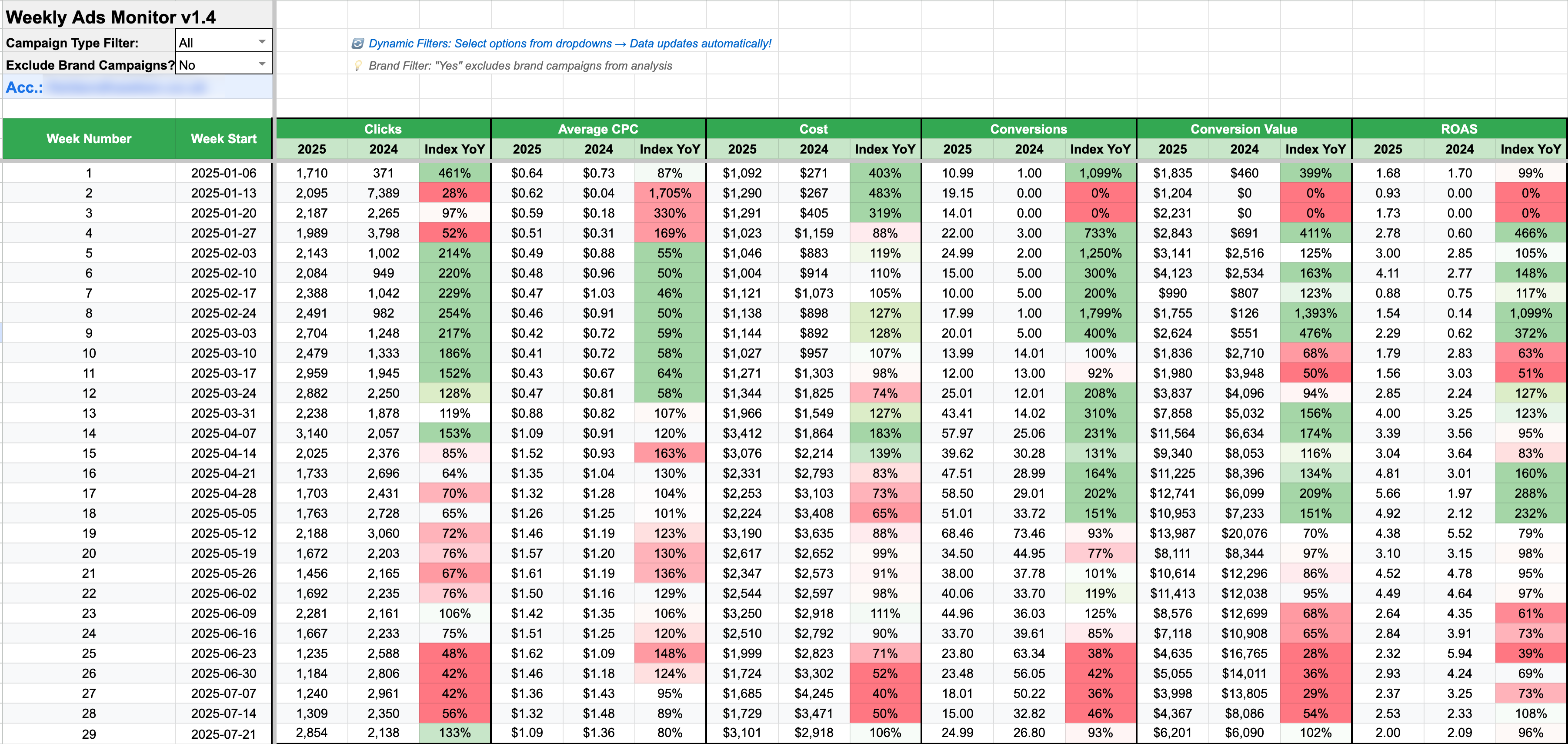
🏋️ Here's a simple Google Ads Weekly Dashboard I made.
It's a straightforward spreadsheet 💯 that breaks down key metrics week by week—things like Clicks, Average CPC, Cost, conversions, conversion value, and ROAS.

There's also a handy year-over-year comparison column so you can quickly spot trends 👀.

Plus, I've added some really convenient filters 💪...

This means you can see all your important data at a glance, saving you valuable time that you might otherwise spend digging through the Google Ads interface.

Everything You Need to Monitor Performance Like a Pro

01

Core Metrics Tracked Weekly 📊:

• Clicks (with year-over-year comparison)
• Average CPC (lower is better – color-coded accordingly)
• Total Cost • Conversions
• Conversion Value
• ROAS (Return on Ad Spend)
02

🤓 Smart Filtering Options:

• View all campaigns together
• Exclude brand campaigns for cleaner performance data
• Filter by campaign type (Search, Display, Shopping, Performance Max, Video)
• Mix and match filters for deeper insights
03

Professional Features 🥷:

• Clean, professional formatting
• Conditional color-coding for instant performance assessment
• Frozen headers and columns for easy navigation
• Automated formulas that update in real-time
• Two-year historical data comparison

How It Works (Seriously, It's This Simple)

📂
Step 1:
Download the free Google Ads script (takes 30 seconds).
Step 2:
Paste it into your Google Ads Scripts section (5 minutes).
Step 3:
Schedule it to run weekly (2 minutes).

That's it. 😎

Every Monday morning, you'll have fresh data waiting for you.
No coding knowledge required. No monthly fees. No complicated setup.
Get Weekly Ad Monitor Now

Why I Built This (And Why I'm Giving It Away Free 🎁)

I'm Andrey Kisselev, and I've been managing Google Ads campaigns for years.

🤔 Like you, I got tired of spending my Monday mornings wrestling with the Google Ads interface just to answer simple questions:

  •  How did last week compare to the same week last year?

  • Are my non-brand campaigns actually improving?

  • Which campaign types are driving the best ROAS?

 🏋️ So I built this dashboard. It saved me hours every week, and now I want to save you time too.

💝 Consider it my contribution to making digital marketing less tedious and more strategic.

Andrey Kisselev
google partnerMicrosoft Advertising Partner

Get Your Free Weekly Ad Monitor Now

What You'll Get:

  • Complete Google Ads script (ready to copy and paste)

  • Step-by-step installation guide

  • Video walkthrough

  • Email support for setup questions

What It Costs:

$0. Completely free. No catch.

What You'll Save:

2-3 hours every week that you can spend optimizing campaigns instead of organizing data.

Frequently Asked Questions:

Q: Do I need any technical skills to set this up? A: Nope. If you can copy and paste text, you can install this. The setup guide walks you through every click.

Q: Will this work with my Google Ads account? A: Yes, it works with any Google Ads account. The script pulls data directly from Google's official API.

Q: How often does the data update? A: You can schedule it to run weekly (recommended) or daily. Most people set it to run early Monday mornings for fresh weekly insights.

Q: Is my data secure? A: Absolutely. The script runs within your own Google Ads account and creates spreadsheets in your own Google Drive. No data leaves your control.

Q: Can I customize which campaigns are included? A: Yes! You can specify brand campaigns to exclude and filter by campaign type. The dashboard updates automatically based on your selections.